¶ IGDShooter
IGDShooter is a 2D top-down multiplayer shooter made by AndrewIGD. Your objective depends on the side you're on. If you're a CT, you have to defend the sites from the Ts, or kill them. If you're a T, then you have to explode your payload at one of the sites present on the map, or eliminate the CTs.
¶ Game Summary
Upon launching the game, you can either host the game, or join a game. The game does not have an official server, so users are required to host games on their own. Players can play with each other either by portforwarding or by using VPNs such as Hamachi, Radmin, or IGD's favourite, ZeroTier.
¶ Gameplay
Upon starting a match, you have to choose to be either a CT or a T. A warmup of a minute and a half ensures, and after that, the match begins.
There game is a BO30. At round 16, the teams are swapped. Equipment that can be bought includes:
- Pistol
- SMG
- Shotgun
- Rifle
- HMG
- Sniper
- HE grenade
- Flash grenade
- Smoke grenade
- Wall grenade
- Armor
After 10 seconds, freeze time is over, meaning that players can move. And after 20 seconds, buy time is over. All of these variables can be modified in the console, which may be accessed by pressing `.
¶ Items
¶ Pistol
- Damage: 20
- Ammo: 15/45
- Bullet speed: 35
- Reload: 0.15
- Slowness: 0.5
- Cost: 200
- Shooting type: Click
¶ SMG
- Damage: 25
- Ammo: 32/96
- Bullet speed: 35
- Reload: 0.125
- Slowness: 1
- Cost: 1200
- Shooting type: Click and Hold
¶ Shotgun
- Damage: 20
- Ammo: 4/20
- Bullet speed: 30
- Reload: 0.3
- Slowness: 1
- Cost: 2400
- Shooting type: Click
¶ Rifle
- Damage: 40
- Ammo: 25/75
- Bullet speed: 35
- Reload: 0.135
- Slowness: 2
- Cost: 4400
- Shooting type: Click and Hold
¶ HMG
- Damage: 12
- Ammo: 100/200
- Bullet speed: 35
- Reload: 0.05
- Slowness: 3
- Cost: 7000
- Shooting type: Click and Hold
¶ Sniper
- Damage: 140
- Ammo: 10/30
- Bullet speed: 50
- Reload: 1.5
- Slowness: 2
- Cost: 10000
- Shooting type: Click and Hold
¶ HE
This explodes an area. Damage depends on how close a player is to the explosion.
- Damage: 200
- Range: 8
- Cost: 600
- Shooting type: Hold and release
¶ Flash
This flashes the screen of another player for maximum 2.5 seconds. The flash duration depends on how close the player is to the explosion.
- Duration: 2.5
- Cost: 600
- Shooting type: Hold and release
¶ Smoke
This smokes an area for 20 seconds.
- Duration: 20
- Cost: 600
- Shooting type: Hold and release
¶ Wall
This spawns a wall when detonated. Players cant pass through it. This can be damaged by bullets, knives, and explosions. Explosion damage is amplified by 10.
- Health: 1000
- Cost: 600
- Shooting type: Hold and release
¶ Armor
This acts as bonus health for the player.
- Health: 50
- Cost: 600
- Shooting type: Hold and release
¶ Knife
This is already owned by the player at the start of every round.
- Damage: 100
- Cost: 0
- Shooting type: Click and hold
¶ UI
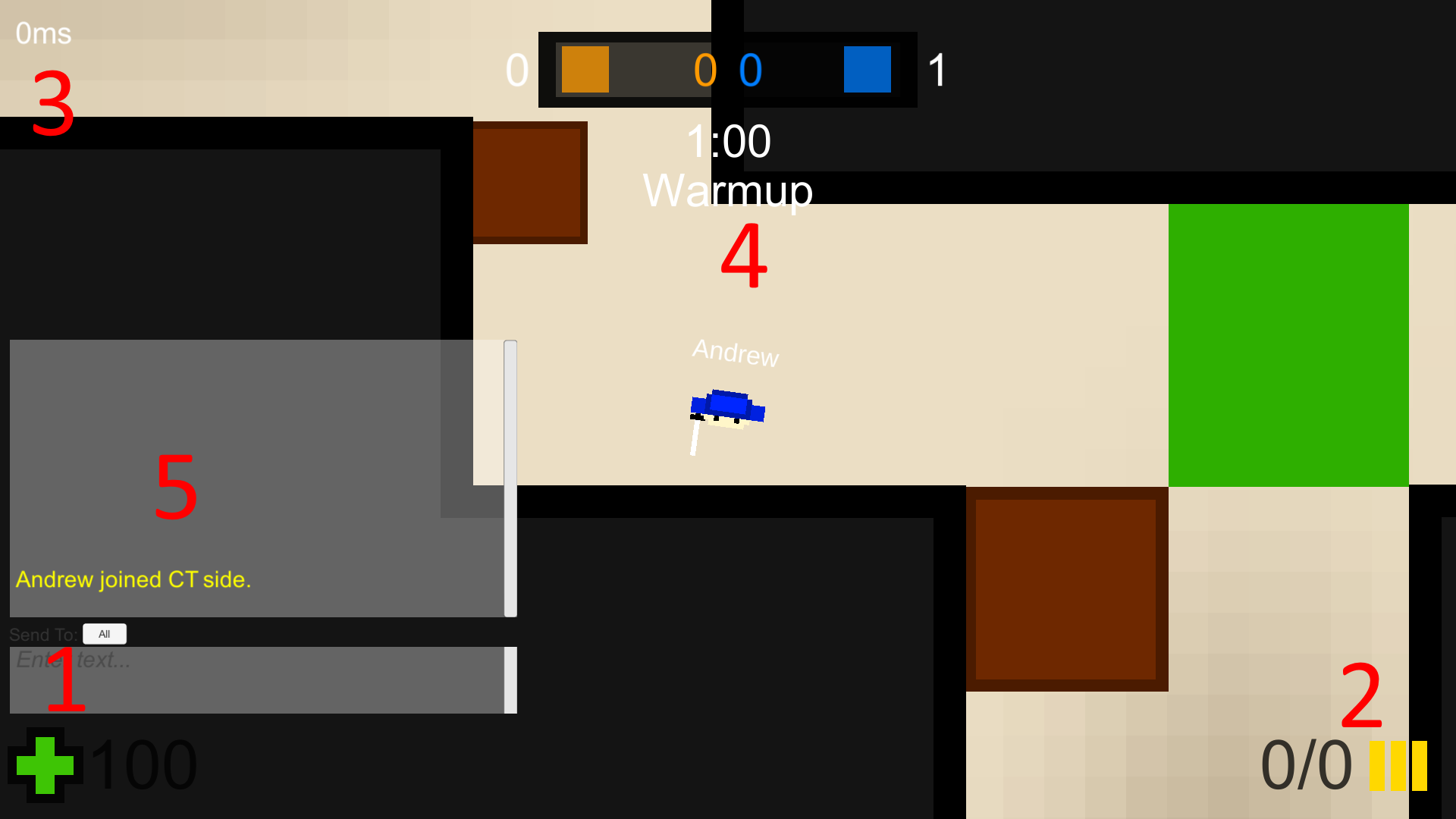
¶ Health and armor
Marked with 1 represents the health and the armor. Armor is not visible as it is equal to 0.
¶ Bullet Count
Marked with 2 represents the remaining bullets of the gun you currently hold.
¶ Ping
Marked with 3 represents the ping.
¶ Info
Marked with 4 represents the match info. Colored numbers in the center represent the score. Numbers on the side represent how many players are left alive. Below, the time can be seen. This can represent either freeze time, round time, or bomb time.
¶ Chat
Marked with 5 represents the chat. This can be accessed by pressing T. Messages can be sent either to everybody, or only to the team. The chat can be used by spectators.
¶ Console
By pressing ` you can access the console. See a list of commands by typing "help".
¶ Map
By pressing M, you can see a map of the whole place. You can see your teammates, enemies that are seen by your teammates, or even the bomb.
¶ Scores
By pressing Tab, you can see the scores of everybody in the game.
¶ Changing Teams
By pressing N, you can change the team. Blue is CT, red is T, and gray is spectator.
¶ Map Editor
IGDShooter also has a built-in map editor. It is basic in functionality, as it only features:
- Adding an object
- Selecting an object
- Moving an object
- Rotating an object
- Resizing an object
- Adding a collider to an object
¶ Adding an object
You can add a new object by pressing "New Tile". This prompts the user to select an image file, such as a .png, .jpg, or many other. When an image is selected, it will appear in the center of the screen in-game, and will be automatically selected.
¶ Selecting an object
To select an object, double click it. Double clicking on the background will de-select the object you've selected. When selecting an object, a menu will appear on the top-right corner of the screen, from which you can move, rotate or scale the selected object. The are also a few options, such as:
- Mark as bombsite: Marks the object as a place where a payload can be planted by the Ts.
- Mark as T/CT buyzone: if either one of them is activated, the object acts as a zone where players can buy items.
- Has collider: The object turns into a wall, meaning players, bullets and grenades cannot pass through them.
- Pixel Art: Option for when the texture of the object is pixel art. When deactivated, pixel art may become blurry. If activated on textures that are not pixel art, the quality of the image may suffer.
¶ Moving an object
Moving an object can be done only if an object is selected. Moving can be done either in the selection menu, either by clicking and holding on the object, while moving the mouse.
¶ Rotating an object
Rotating an object can be done only if an object is selected. Rotated can be done only in the selection menu. Rotating an object past 1 degrees on either of the axis disables scaling by hand, as IGD has not yet discovered an algorithm for handling rotated objects.
¶ Resizing an object
Resizing an object can be done only if an object is selected. Resizing can be done either in the selection menu, either by clicking and holding on one of the edges of an object, while moving the mouse.
¶ Other options
There are a few other buttons that an user can use, such as:
-
Add CT/T Spawn: These mark a spot on the map where a CT/T can spawn. These are the same size as a real player, so these can be used to scale maps. Players will spawn in the same order as the spawns were created. When the game runs out of spawns, it will spawn players back from the first spawn created.
-
See: Marks every object that has a collider with green. This can be used to see where players are not allowed to go.
-
Leave: Prompts the user back into the map selection screen.
¶ Memes
¶ HMG
The heavy machinegun is considered one of the most broken weapons in the game because of its very good attack speed. Because of this, players are able to defend sites very well, without even needing to see the enemies. This has caused the weapon to become a massive meme, very well known in the Deprimus group. This meme may be used when talking about meta or strategy in a game.
Example Usage:
- Person 1: I learned all the nades in IGDShooter, I'm gonna destroy all of you!
- Person 2: Nah, we'll get 2 hmgs on long and that's it, ez win
¶ 131071
When AndrewIGD started networking the game, the game was running poorly. That is until one day he discovered that the default buffer size for sending and receiving packets was of 131071 bytes. Andrew was astonished when he found out, and because of that, this number became a meme, even being the defusal code for the payload featured in NewDimension.
¶ Trivia
-
The game was the first ever functional multiplayer game made by AndrewIGD. He considers it to be an amazing game, being one of the best he's ever made.
-
The biggest known IGDShooter LAN ever hosted was a 4v3 on June 20th, on AndrewIGD's birthday. The match unfortunately didn't last for long, as the Deprimus group had to leave a few minutes after the match's beginning.